#InboxUpgrade2020
Page 2
Creating Your First HTML Webpage
First off, you need to open your HTML editor, where you will find a clean white page on which to write your code.
From there you need to layout your page with the following tags.
Basic Construction of an HTML Page
These tags should be placed underneath each other at the top of every HTML page that you create.
<!DOCTYPE html> — This tag specifies the language you will write on the page. In this case, the language is HTML 5.
<html> — This tag signals that from here on we are going to write in HTML code.
<head> — This is where all the metadata for the page goes — stuff mostly meant for search engines and other computer programs.
<body> — This is where the content of the page goes.
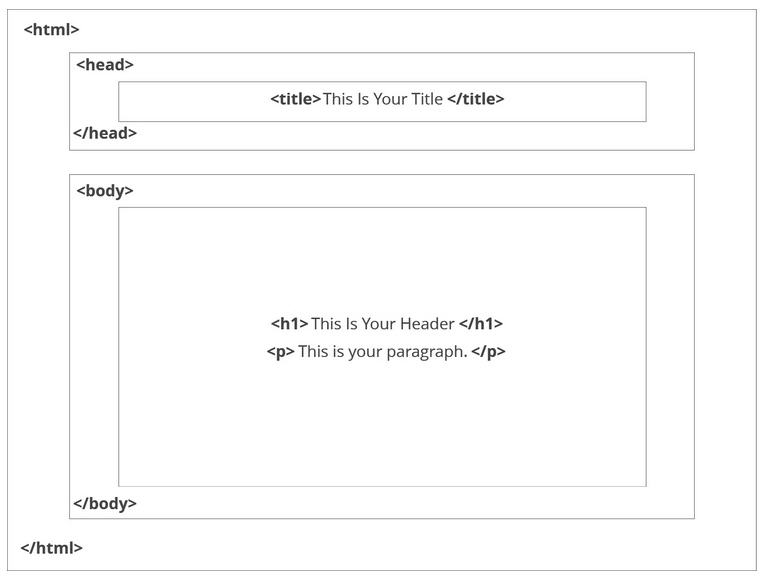
This is how your average HTML page is structured visually.
Further Tags
Inside the <head> tag, there is one tag that is always included: <title>, but there are others that are just as important:
<title>
This is where we insert the page name as it will appear at the top of the browser window or tab.
<meta>
This is where information about the document is stored: character encoding, name (page context), description.
Let's try out a basic <head> section:
We can practice the basic <head> section with a code editor from your phone or pc.
Since it doesn’t display on the screen We will practice the <body> tag Section
Adding Content
Next, we will make <body> tag.
The HTML <body> is where we add the content which is designed for viewing by human eyes.
This includes text, images, tables, forms and everything else that we see on the internet each day.
How to Add HTML Headings To Your Web Page
In HTML, headings are written in the following elements:
<h1>-
<h2>-
<h3>-
<h4>-
<h5>-
<h6>
As you might have guessed <h1> and <h2> should be used for the most important titles, while the remaining tags should be used for sub-headings and less important text.
Search engine bots use this order when deciphering which information is most important on a page.
Creating Your Heading
Let’s try it out. On a new line in the HTML editor, type:
<h1>Welcome to My Page</h1>
Well let’s not get carried away; we've still got loads of great features that we can add to your page.
How To Add Text In HTML
Adding text to our HTML page is simple using an element opened with the tag <p> which creates a new paragraph. We place all of our regular text inside the element <p>.
Although text can be added without any tags but those test can never be formatted correctly
When we write text in HTML, we also have a number of other elements we can use to control the text or make it appear in a certain way.
Other Key Elements
They are as follows:
|
Element |
Meaning |
Purpose |
|
<b> |
Bold |
Highlight important information |
|
<strong> |
Strong |
Similarly to bold, to highlight key text |
|
<i> |
Italic |
To denote text |
|
<em> |
Emphasised Text |
Usually used as image captions |
|
<mark> |
Marked Text |
Highlight the background of the text |
|
<small> |
Small Text |
To shrink the text |
|
<strike> |
Striked Out Text |
To place a horizontal line across the text |
|
<u> |
Underlined Text |
Used for links or text highlights |
|
<ins> |
Inserted Text |
Displayed with an underline to show an inserted text |
|
<sub> |
Subscript Text |
Typographical stylistic choice |
|
<sup> |
Superscript Text |
Another typographical presentation style |
These tags must be opened and closed around the text in question.
Let’s try it out. On a new line in the HTML editor, type the following HTML code:
<p>Welcome to <em>my</em> brand new website. This site will be my <strong>new<strong> home on the web.</p>
Use the table above to format text now.